
Telenor balance check code: *444# and the app
Check cash balance with *444#, choose the right SIM, understand inquiry charges, and troubleshoot a failed request.
Quick answer: the Telenor balance code
The Telenor balance check code is *444#, as listed in Telenor Pakistan’s self-service resource book. It is a balance inquiry, not a recharge, bundle activation, or balance-transfer code. Enter it in your phone’s dialer and send it from the Telenor line.
Use this method when you want to check the account’s cash balance. If your question is how many MB, minutes, or SMS remain in a bundle, use the remaining-resource check instead. Cash and bundle allowances describe different things.
- Open Phone and its keypad or dial pad.
- Type *444# exactly, including the first star and last hash.
- Choose the Telenor line if the phone asks which SIM to use.
- Tap the call/send button and read the network’s response.
- Close the message after noting the amount privately.
Visual walkthrough: Android & iPhone
Original tutorial illustrations, not captured account screenshots. Buttons may differ by phone and dialer version.
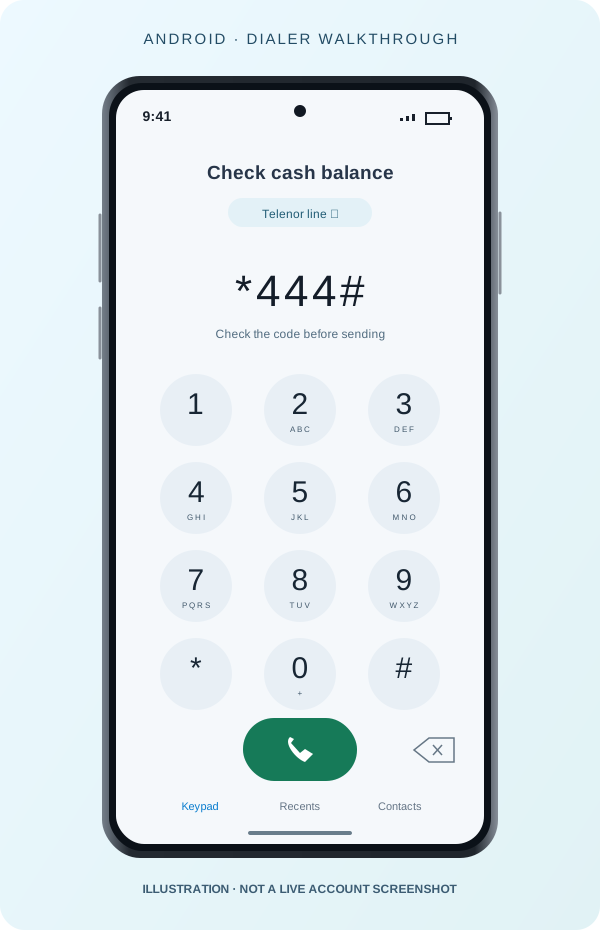
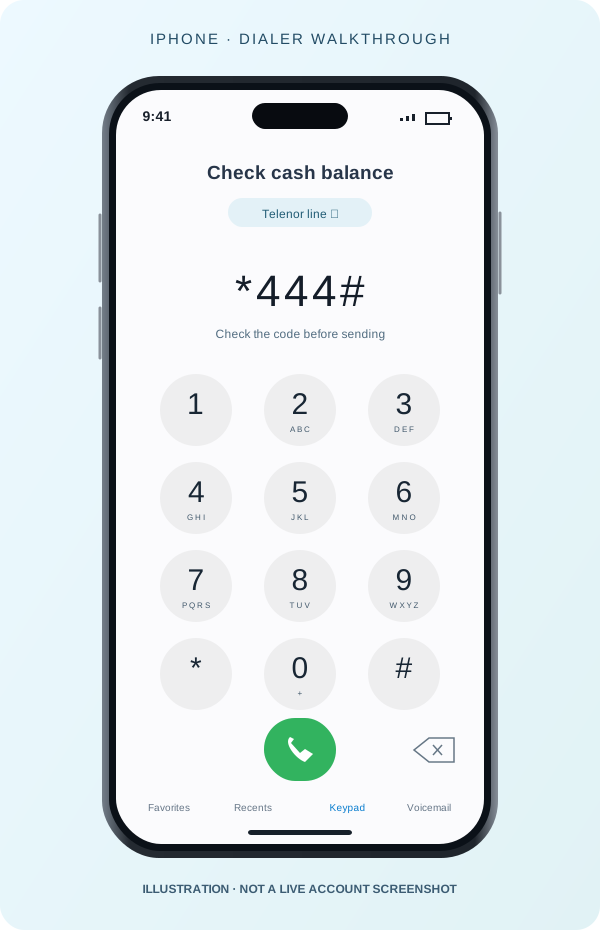
Android and iPhone: choose the Telenor line
On a dual-SIM Android phone, the call button may offer two SIM choices, or the dialer may use a default line. Choose the Telenor SIM before sending the inquiry. A code sent on another network is not a Telenor account check. Your dialer’s buttons may look different from our illustration.
On iPhone, open Phone and Keypad. If more than one line is configured, check the selected line and switch to Telenor before making the request. The labels depend on how you named your SIM or eSIM. This site never places the call for you; the illustrations show the code before it is sent.
Does a balance or MB inquiry cost money?
Telenor’s undated self-service resource book lists an inquiry charge for these codes. That confirms they should not be described as free. It does not establish the amount you will pay today: the document has no visible revision date, and taxes or service terms may change.
Check the current charge through official support before making repeated inquiries. We do not publish an old document’s price as a current tariff. The official My Telenor listing describes balance and bill checking as free; internet access to the app can still use data.
Check in My Telenor instead
Open the official My Telenor app, confirm the account, and read its balance or bill information. The official listing supports this feature for prepaid and postpaid users. A prepaid cash balance is different from a postpaid bill; read the label before comparing amounts.
After a recharge, refresh the account view before deciding that the amount is missing. Keep the receipt and compare the credited amount, deductions, and current balance. A recharge receipt is evidence of a payment, not a guarantee that the same amount remains unused.
If the USSD code fails or shows an error
First recheck the stars, digits, and final hash symbol. Then confirm the intended SIM is enabled and connected to the mobile network. USSD travels through your mobile service; connecting to Wi-Fi alone does not make a disabled SIM work.
Close the error message and retry once after the signal has returned. Avoid repeatedly dialing a chargeable inquiry. If the message says the service is unavailable, your phone cannot fix the network service by changing unrelated settings.
Use the official app as the alternative and contact Telenor support if both methods fail. Keep the error wording, time, selected line, and app version for support. Do not publish your complete number, account balance, OTP, or other private account details in a correction report.
Questions people ask about balance checks
Can I see my balance on this website? No. We explain the steps and code; only the operator can read your live account. Do not enter your mobile number or login details into a third-party balance-check form.
Does *444# activate a package? The official resource lists it as a balance inquiry. Do not confuse it with an activation code you find in an offer advertisement. If a prompt offers a paid service, read it before accepting.
Why is my balance low while I still have MB? Cash balance and purchased data are separate. Check the MB amount, restrictions, and expiry before deciding what to recharge. If a deduction cannot be explained from your account information, use official support.
Frequently asked questions
Does *444# check data or money?
Use *444# for the cash balance inquiry described by Telenor’s resource guide. Data, minutes, and SMS are separate resources. A balance of zero does not by itself show that all bundle allowances are exhausted.
Is checking the balance free?
The official app listing describes free balance viewing in the app. USSD inquiry charges may differ, and we have not verified the current fee on the owner’s SIM. Read any charge shown before proceeding; do not assume an old published tariff still applies.
Why does my second SIM show a different balance?
Each SIM has its own account. Check the selected calling SIM before sending the code, and compare it with the account displayed in My Telenor. A phone’s default data SIM is not necessarily the SIM selected in its dialer.
Can this site explain an unexpected deduction?
We can explain the inquiry process but cannot see your account charges. Note the time, amount, and any active offer, then use official account support. Do not post your number or private account screenshots in a correction report.
Sources & review
- Telenor Pakistan — self-service resource book, page 1 (accessed 6 October 2026; document has no visible revision date)
- My Telenor — official app listing (reviewed 6 October 2026)
App menus and available features can vary by version and account. Use our corrections page to flag a mismatch.
Report an issue →